How to Build Your First Follow-Up Sequence
You followed up once. Maybe twice. Then you got busy and moved on.
The lead went cold. A few weeks later, you found out they hired someone else. And the frustrating part? They were interested. They just needed more time, and you stopped showing up.
That is not a sales problem. That is a systems problem. And a follow-up sequence is how you fix it.
Key Takeaways
A follow-up sequence is a series of automated messages triggered by a specific event, like a form submission or missed call.
Start with one trigger and three messages. Do not build a 12-step campaign on your first attempt.
Message 1 acknowledges the lead immediately. Message 2 adds value at 24 hours. Message 3 makes a soft ask at 3 days.
Set it up in your CRM once, then review it after 30 days. Adjust from there.
What a Follow-Up Sequence Actually Is
A follow-up sequence is a series of messages that go out automatically after someone takes a specific action. The action triggers the sequence. The sequence runs without you.
You are not sending these messages manually. You write them once, set the timing, and your CRM handles the rest. While you are working on other things, the sequence is in the background, staying in front of people who are still deciding.
When someone fills out your form, the sequence starts automatically. No manual step required.
The most common trigger is a new lead submitting a form. But it could also be a missed call, a new contact added to your CRM, or someone requesting a quote. Pick one to start. You can build more later.
A three-message sequence that runs automatically is worth more than a perfect twelve-step campaign that never gets built.
Step 1: Pick Your Trigger
A trigger is the specific action that kicks off the sequence. Before you write a single message, you need to know what starts the clock.
For most small businesses, the right starting trigger is a new lead form submission. Someone visits your website, fills out your contact form, and that action automatically enrolls them in the sequence.
Here is the rule: pick one trigger. Do not try to build five sequences at once. Build one, get it running, and see how it performs. You can expand after you have something working.
Step 2: Write Three Messages
Most business owners overthink this part. You do not need a 12-step email campaign. You need three messages, each with a clear job to do.
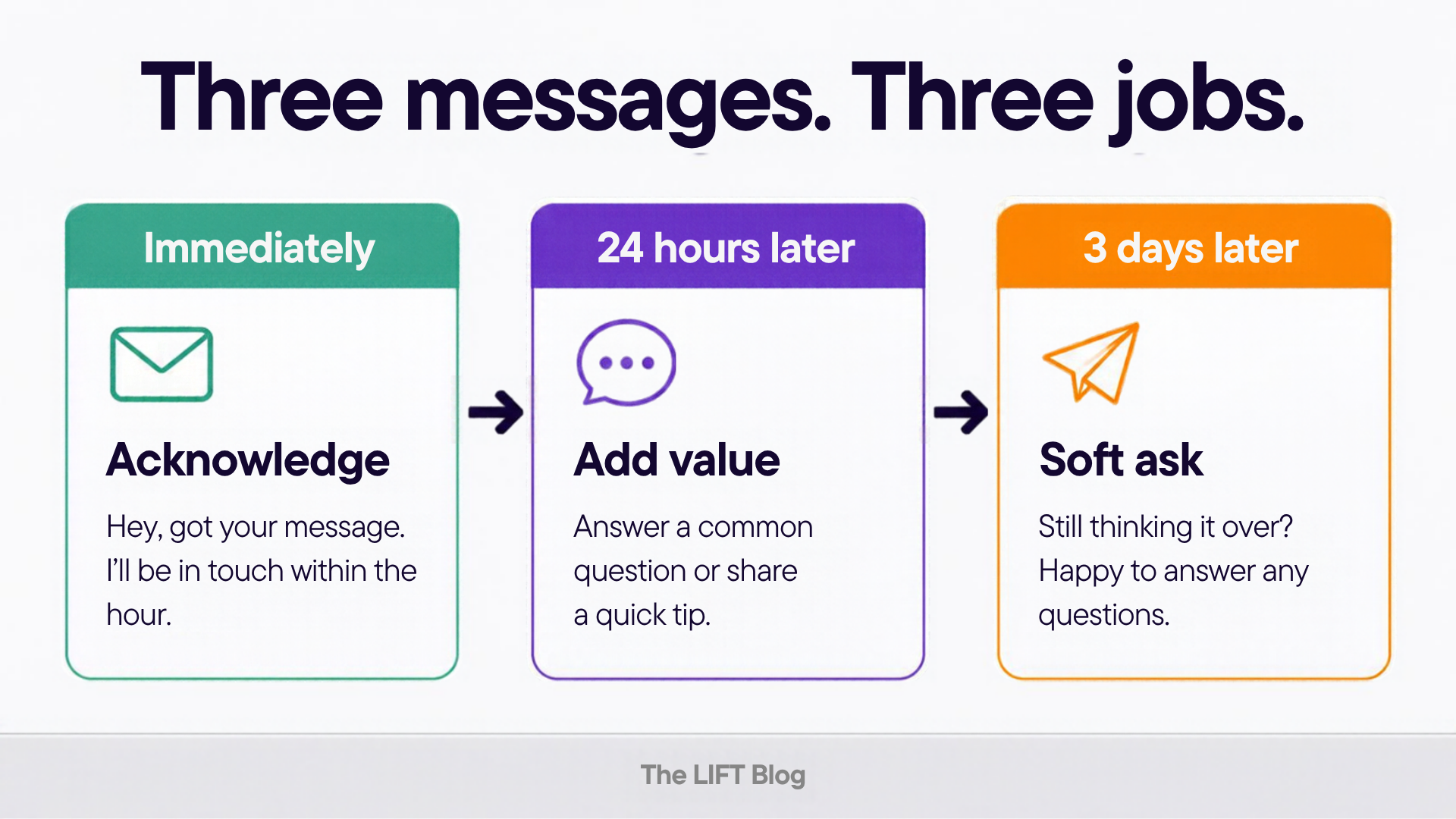
Three messages. Three jobs. That is the whole sequence.
Message 1 (Immediate): Acknowledge. Send a text within minutes of the form submission. Something like: "Hey, got your message. I'll be in touch within the hour." That is it. No pitch. No links. Just confirmation that a real person received their inquiry. This one message alone will set you apart from most of your competitors, who respond hours or days later.
Message 2 (24 hours later): Add value. Send an email with something genuinely useful. Answer a common question your customers ask. Share a quick tip related to what they inquired about. Link to a relevant post on your blog. This is not a sales pitch. It is proof that you know what you are talking about.
Message 3 (3 days later): Make a soft ask. Keep it short. "Still thinking it over? Happy to answer any questions. Here is how to reach me." That is the whole message. No pressure. No countdown timer. Just an open door.
Step 3: Set It Up in Your CRM
If you are using a CRM with automation, this takes about 20 minutes to build. You set the trigger, write the three messages, add the time delays, and turn it on.
A basic three-step workflow in your CRM. Trigger, wait, send. Build it once and let it run.
The workflow looks like this: trigger fires, first message sends immediately, 24-hour wait, second message sends, 72-hour wait, third message sends. Done.
If you are using LIFT CRM (powered by HighLevel), you can build this in the Workflows section. Set your trigger to "Contact Created" or "Form Submitted," add your messages, set the wait steps, and activate. If you want help with the exact setup, this post on building a CRM that drives revenue walks through the operational framework behind it.
Step 4: Review It After 30 Days
A follow-up sequence is not a one-time project. It is a living system. After 30 days, look at the data.
Who replied? Who unsubscribed? Did anyone ask to be removed? Which message got the most responses? If Message 2 is getting replies and Message 3 is getting ignored, that tells you something. Adjust the timing or the copy and run it for another 30 days.
Most business owners build the sequence and never look at it again. The ones who get results treat it like a process they improve over time, not a box they check once.
Your Starting Point
Write one text message you would want to receive if you had just filled out a form for a service you were considering. Make it feel like it came from a real person, not a robot. That is Message 1.
Start there. Get that one message running. Then build the rest.
If you want to see how this fits into a broader system for turning contacts into customers, this post on why more leads will not fix your follow-up problem is worth reading first. It explains the gap this sequence is designed to close.
Want to see how LIFT CRM handles follow-up sequences out of the box? Learn more about LIFT Growth Systems and how we help small businesses build systems that run without them.